Xello 6-12
 1 minute
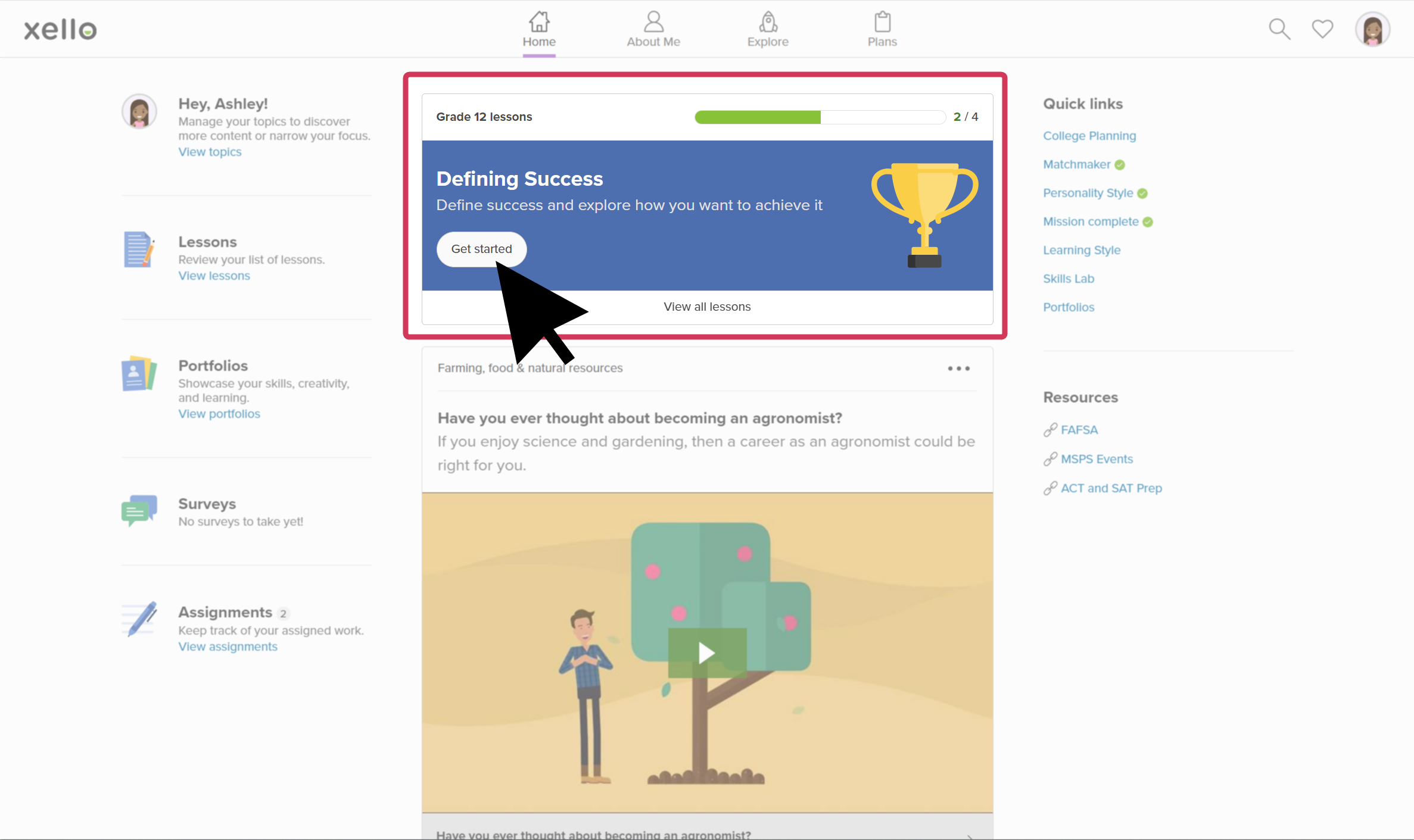
To review the content and see what your students see when completing Xello Lessons, you can explore all available lessons from your student demo account.
 FYI: Need a reminder on how to access and log in to your Demo student account? Check out Access your demo account.
Once in your student demo account, to access Lessons:
- Open Home and click Lessons to view all lessons.
 Click to enlarge
- Click a lesson to start experiencing it as one of your students would: make selections, learn about careers, provide reflection answers, but make sure you have the prerequisites done first!
- Don't know about the prerequisites for Lessons? Check out Lesson prerequisites for students to learn more.
Additional resources
-
 PDF
PDF
-
PDF
PDFXello 6-12: Recommended scope and sequence for monthly activities
This guide outlines a sequence of tasks that can easily be adapted for 10 monthly 20-minute sessions where Xello will be used to address post-secondary preparedness and planning.
-
PDF
PDFXello 6-12: Recommended scope and sequence for quarterly activities
This guide outlines a sequence of tasks that can easily be adapted to accommodate 4 60-minute sessions per year where Xello will be used to address post-secondary preparedness and planning.
-
PDF
PDFLessons in Xello - student guide
View and share this guide with your students to help them get started with Lessons in Xello.
-
 Google Doc
Xello 6-12 classroom delivery guide
Google Doc
Google DocXello 6-12 classroom delivery guideMake a copy and edit this guide to simplify your experience with delivering assigned Completion Standards tasks. Links to supporting resources and lesson plans provide everything you need.
-
 Short video
Lessons in Xello
Short video
Short videoLessons in XelloCheck out this video to learn how Xello's fully interactive,
-
Short video
Short videoYour dashboard - student-facing video
Share this short video with students to help them learn all about their Xello dashboard.
-
 SUPPLEMENTARY RESOURCE
Introducing Xello 6-12
SUPPLEMENTARY RESOURCE
SUPPLEMENTARY RESOURCEIntroducing Xello 6-12Use the resources on this page to help introduce Xello 6-12 on the first day of class. The presentation and video will help get students started!.
-
 Xello Academy
Instructional Tips for Xello 6-12
Xello Academy
Xello AcademyInstructional Tips for Xello 6-12In this course, you'll explore key tools, discover classroom implementation strategies, and receive teaching tips to help you and your students get the most out of Xello!
-
 Xello Resource
Integrated Lessons in XelloUse this walkthrough to explore how Xello's interactive Lessons helps students build critical skills and knowledge for real-world success while encouraging ongoing reflection.
Xello Resource
Xello ResourceIntegrated Lessons in XelloUse this walkthrough to explore how Xello's interactive Lessons helps students build critical skills and knowledge for real-world success while encouraging ongoing reflection.
 Select