


 4 minutes
Students applying to colleges through Common App can request teacher evaluations from educators outside their current school district. When a student requests a recommendation for a Common App institution, you will receive an email invitation to submit your evaluation through a secure external portal.
The teacher evaluation is sent to all the Common App colleges the student has assigned to you. This means you only need to fill it out once. Make sure your letter is specific to the student's accomplishments and not to the institution they're applying to.
Access and verification
Once a student submits an evaluation request, you'll receive an email invitation with a link to Xello to begin. You'll enter your email address to receive a temporary access code, sign a waiver, and log in to your Xello external teacher portal.
To access and verify an external teacher Xello account:
- Open the email invitation from Xello and click View request.
- The email will include the name of the student, where they're applying, the deadline, and a link to view the request.
- Enter your email address to be sent a sign-in code.
- The code will expire in 10 minutes after being sent. If you didn't get to it in time, you can request a new code.
- Enter the 6-digit code sent to your email and click Continue.
- Review the terms, confirm you are at least 18 years old, accept the waiver, and click Accept and continue to access your external teacher portal.
 Back to top
Set up your teacher profile
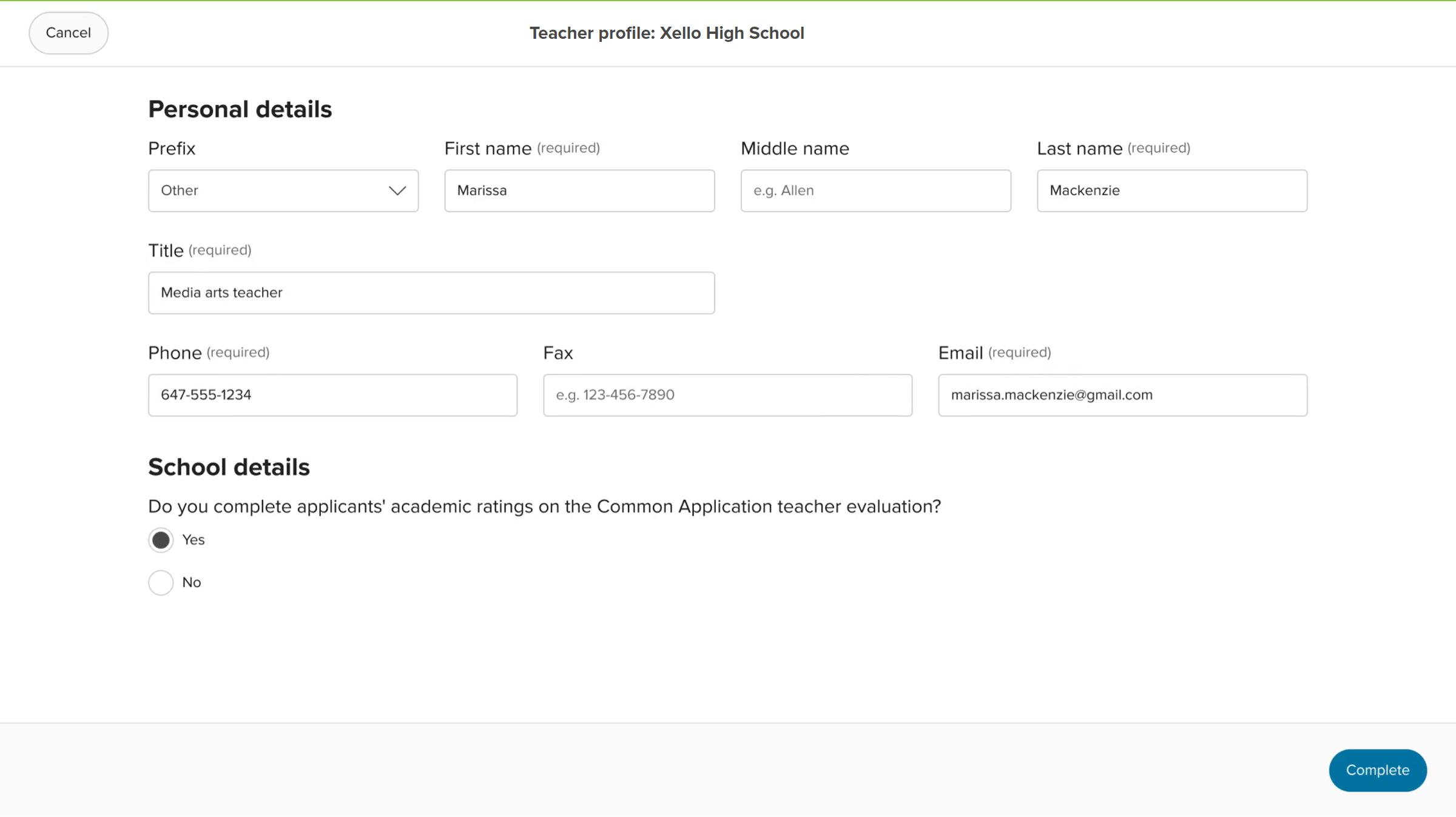
Before you can submit an evaluation, Common App requires basic contact and professional details for your profile. This information is saved to the high school listed in the student's request and carries over for future requests from that same school.
To complete your teacher profile:
- In the Complete your teacher profiles banner, click Complete profile.
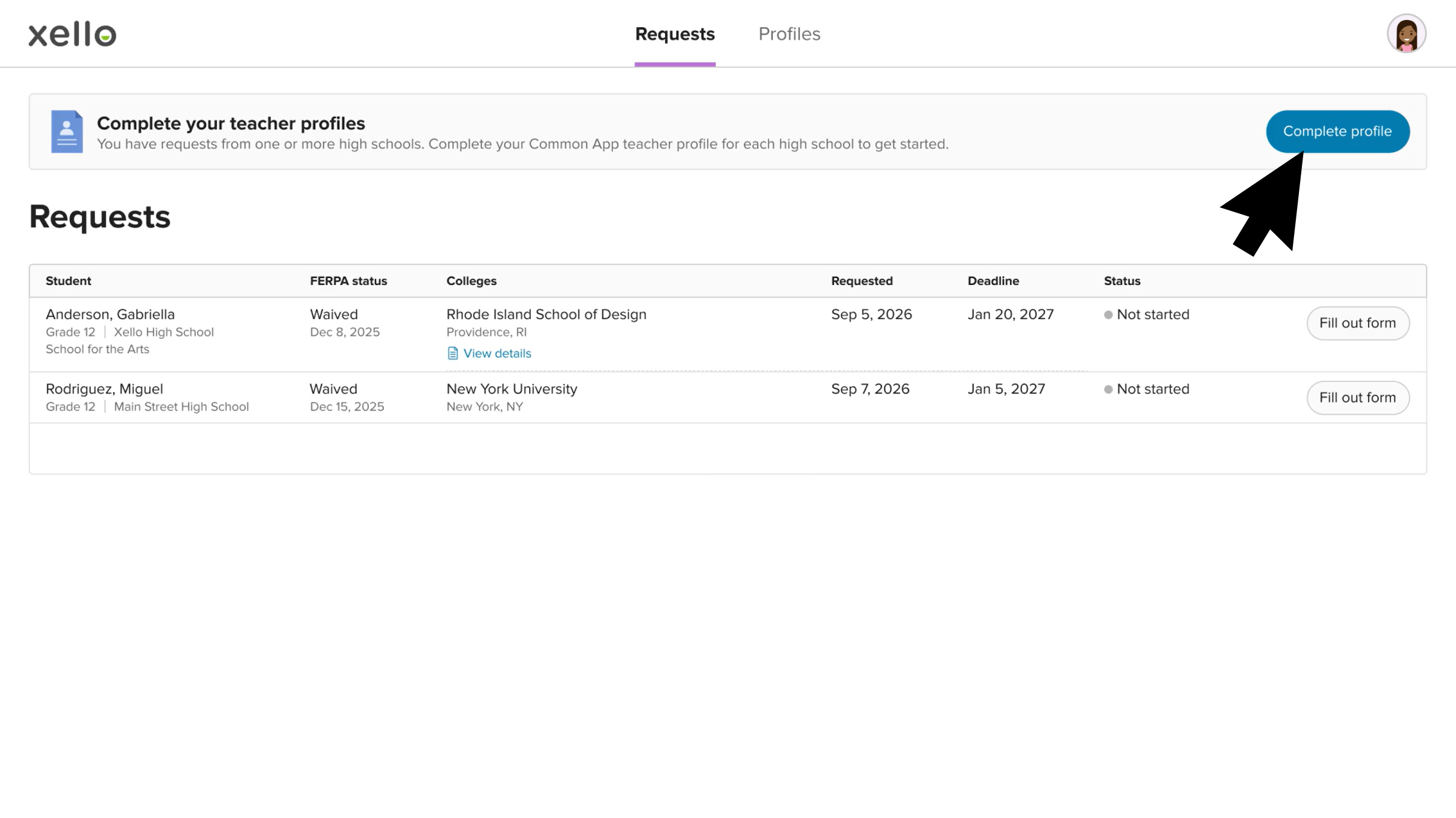 Click to enlarge
- Next to the listed school, click Set up profile.
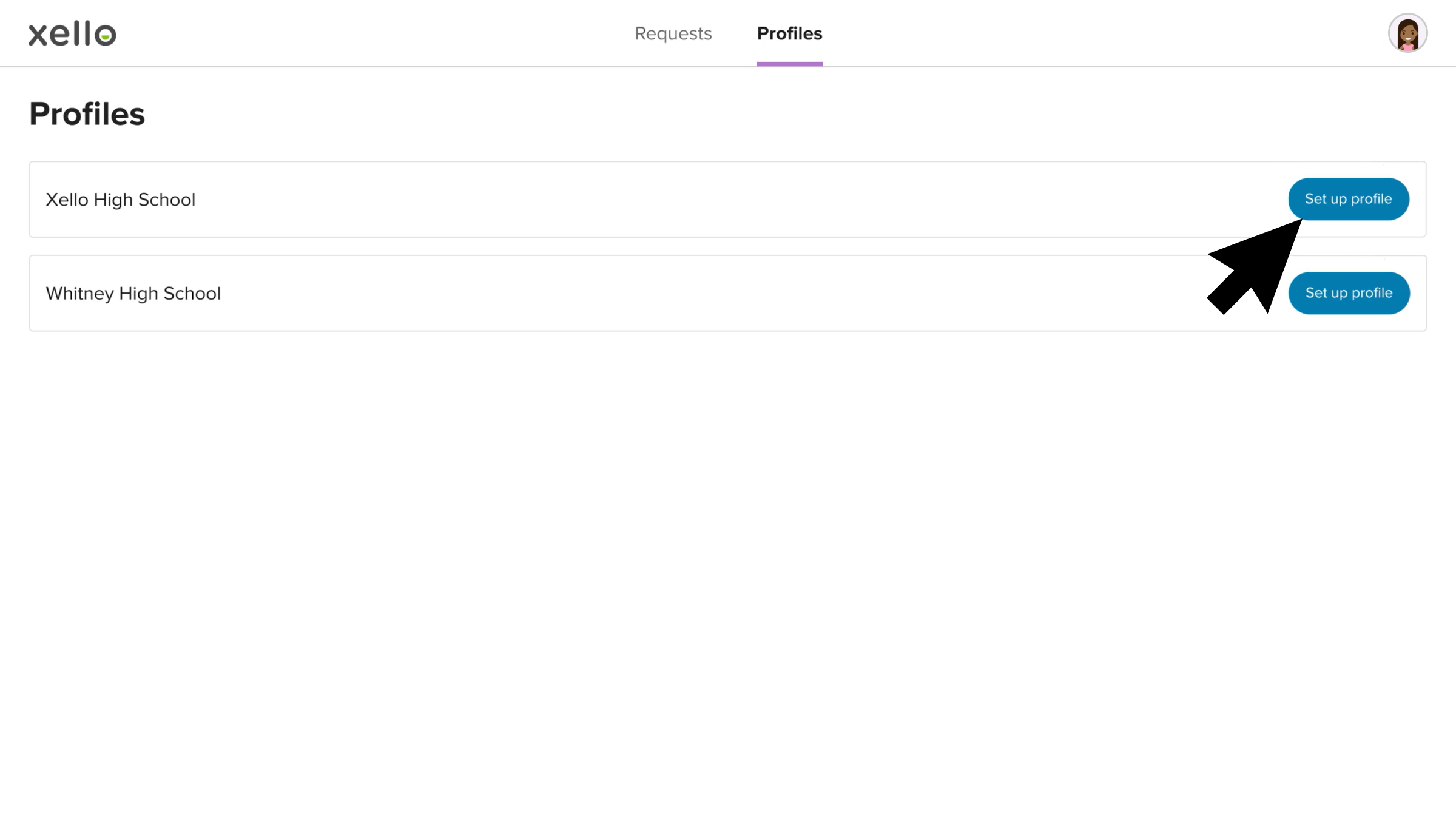 Click to enlarge
- In the teacher profile form, complete all required personal and school details and click Complete.
 Click to enlarge
- If you've received requests from students for more than one high school, you'll need to complete this profile for each high school.
Complete and send the recommendation
After setting up your teacher profile, you can fill out the evaluation form and upload your letter of recommendation.
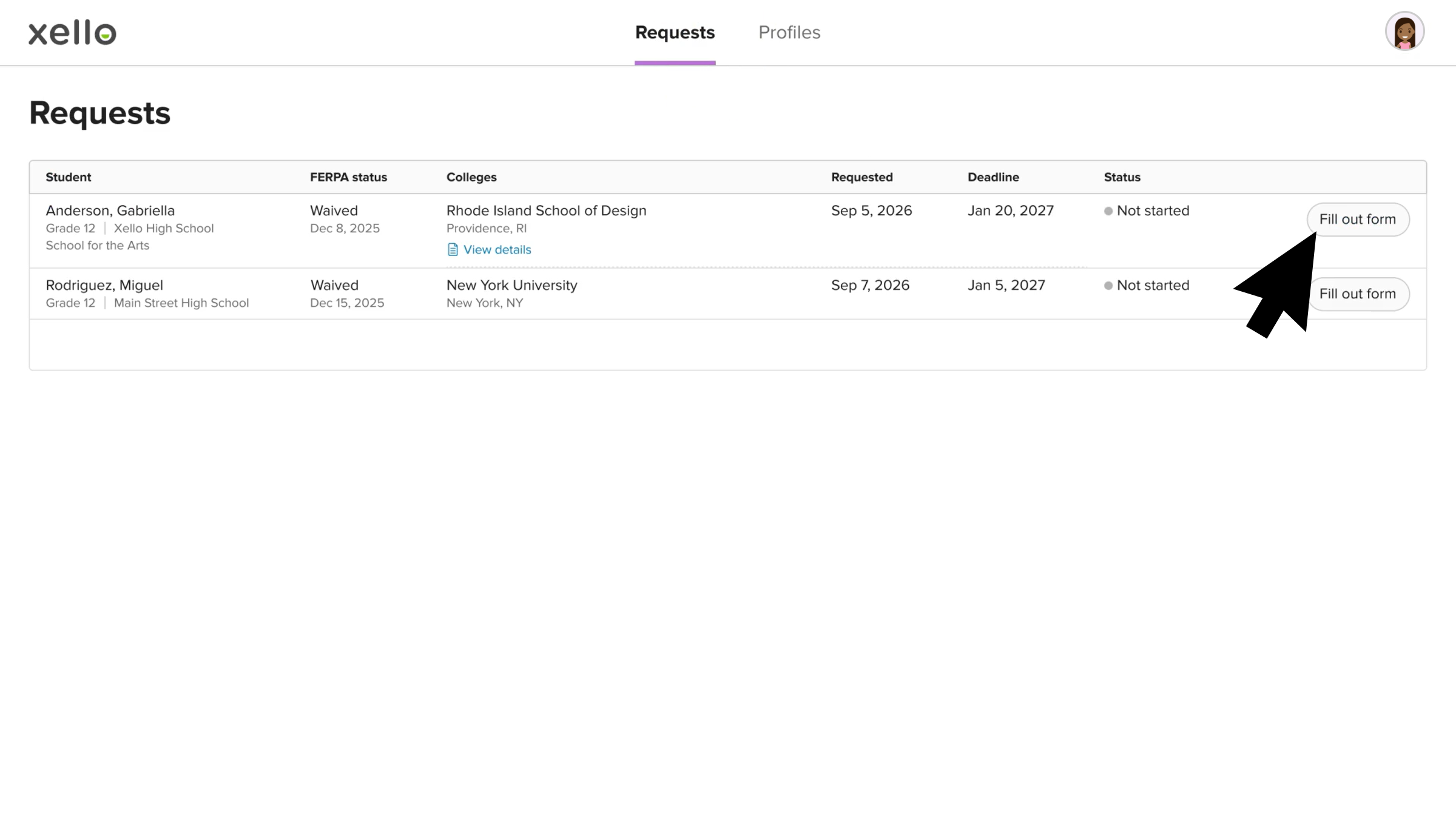
To complete and send the recommendation for the student:
- On the Requests page, in the row of the student request, click Fill out form.
 Click to enlarge
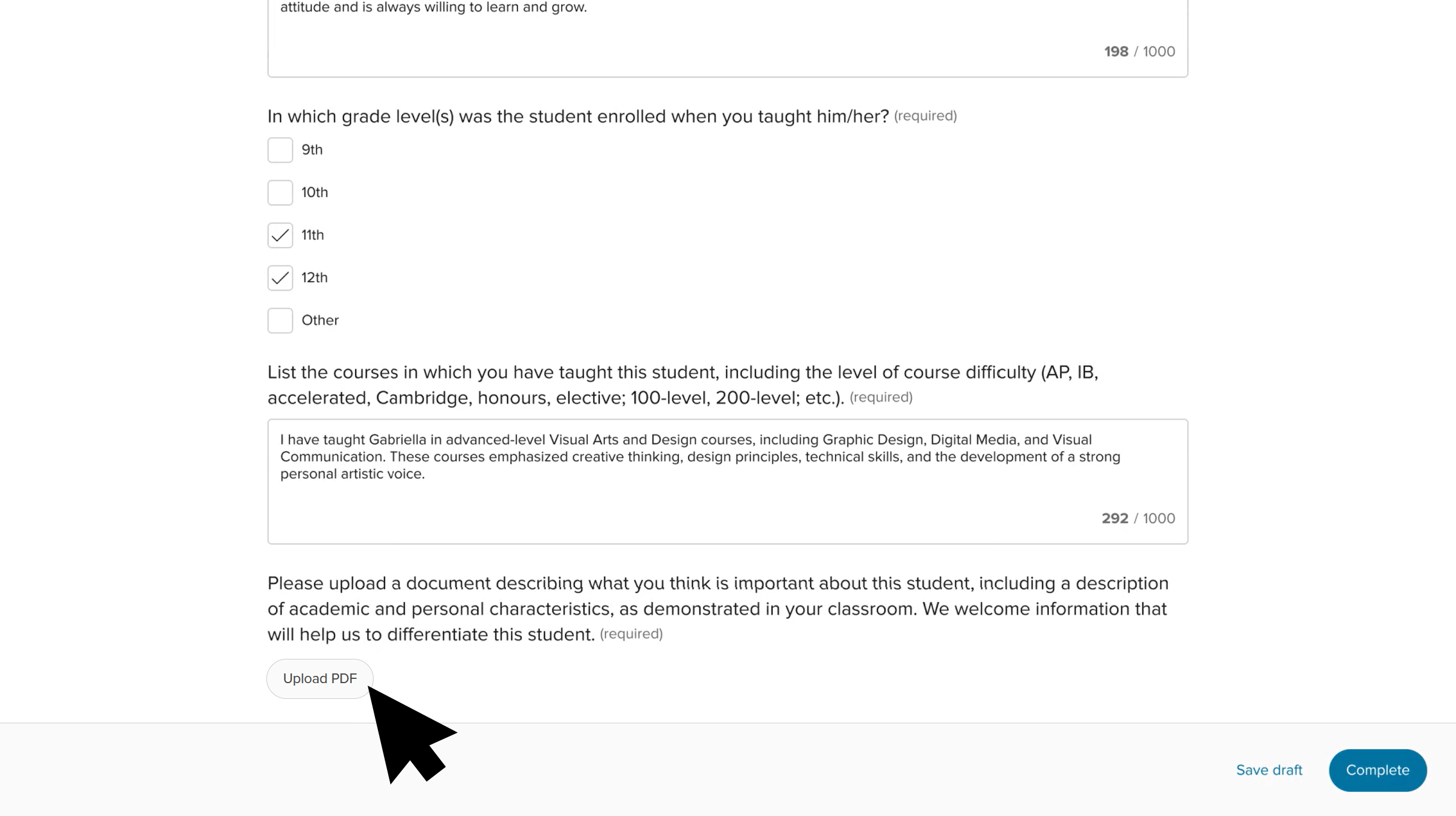
- Complete the required fields, including subject area taught, and written evaluations.
- At the bottom of the form, click Upload PDF to attach your formal letter of recommendation.
 Click to enlarge
- Once you've finished filling out the form, click Complete.
- Alternatively, you can click Save draft to save your work and complete it later.
- A green banner will indicate you've successfully completed the teacher evaluation and you'll be returned to the Requests page.
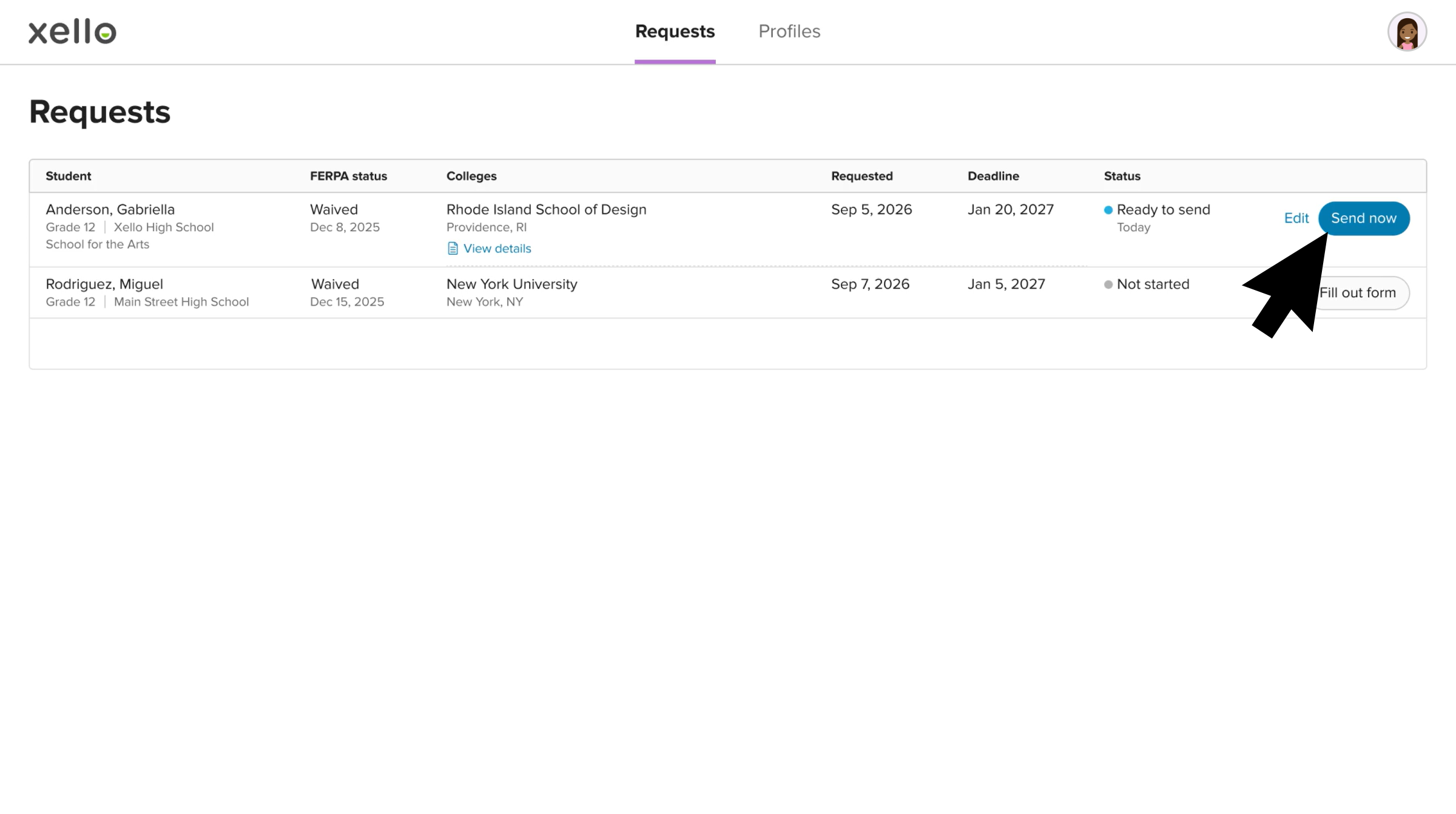
- The student request will have a status of Ready to send.
- To send the form to Common App, click Send now.
 Click to enlarge
- A green banner will indicate the teacher evaluation was successfully sent.
Video walkthrough
Check out this quick video walkthrough of the steps you'll need to complete to send a recommendation for a student:
Additional resources
-
 PDF
PDFCollege applications for counselors - educator guide New
Use this guide as a timeline of educator tools, tracking reports, and shareable guides to support students through every stage of the college application process in Xello.
-
PDF
PDFCommon App guide - educator guide
Use this guide to learn how students use Common App in Xello, and how you set up a Common App profile, complete student requests, track their progress, and more.
-
 Short video
Requesting college documents in Xello - video for students
Share this video with students to help them track their college application journey with Xello's College Planning section. Learn how they create application trackers for institutions they're applying to and how Xello will automatically pull in deadlines to help manage their application checklists.
-
Short Video
Short VideoLinking your Common App to Xello - video for students
A student-facing video covering how students link their Common App account with Xello.
-
PDF
PDFCommon App and Xello - student guide
Share this guide with your students to help them link their Xello and Common App accounts, prefill profile data, and request recommendations.
-
PDF
PDFCommon App teacher recommender - educator guide
This guide will help recommenders set up a Common App profile, review and action student requests, submit and unsubmit teacher evaluations.
-
PDF
PDFExternal referrers in Xello - educator guide
Share this step-by-step walkthrough for mentors, employers, and external recommenders submitting letters or Common App evaluations requested by students in Xello.
-
 Walkthrough
Common App integration walkthrough
This walkthrough covers how students link their Common App account to Xello to request documents, how educators create a Common App profile, and manage and track student requests.
-
PDF
PDFCommon App annual tasks - admin and counselor guide
A guide to help admin and counselors with wind-down tasks before the end of the Common App school year and start-up tasks before the next.
-
 Xello Academy
Xello + Common App for Counselors
If you're a counselor at a school that uses Common App, then you'd benefit from this course. You'll understand your role in the process, as well as steps for teacher recommenders and students.
-
Recorded webinar
Recorded WebinarXello and Common App 101
Xello and Common App have partnered to deliver an integrated college application management experience. In this session, learn how you and your students will manage Common App applications through Xello.
-
Short video
Short videoPaying for college - student-facing video
Help students learn how to navigate their financial aid options. From applying for FAFSA to learning about scholarships, grants, work-study, and loans.
-
Short Video
Short VideoRequesting your documents for Common App - video for students
A student-facing short video that walks through how to request documents for Common App in Xello.
-
Short Video
Short VideoXello's Common App integration for counselors
A short video to walk counselors through how to integrate and begin completing tasks for Common App in Xello.
-
Short Video
Short VideoCommon App teacher recommender through Xello
A quick overview of how teachers complete teacher evaluations for students applying to Common App colleges.
 Select


